

SAP to Databricks migration: Avoiding the PowerCenter support cliff
SAP to Databricks migration: Avoiding the PowerCenter support cliff
Written by
Tenjumps
Share
SAP has powered core business processes for decades, but the way most teams still work with SAP data should no longer be business as usual. Transactional screens and legacy reports lock away the very business data analytics and AI programs depend on. As data volumes grow and leaders expect real-time insight, exports and point‑to‑point ETL start to show their limits. The result is fragmented datasets, brittle integrations, and answers that arrive too late to influence decisions and not to mention the integrations and reconciliations across different sources get expensive.
At Tenjumps, we help teams move from SAP‑centric reporting to a Databricks Lakehouse model where curated SAP data lands in Delta Lake and Delta tables, governed centrally by Unity Catalog. From there, your teams can work with that data using SQL, Python, and the BI tools they already trust. We design and implement repeatable pipelines and data flows that bring SAP into your wider data cloud and ecosystem without compromising secure data or destabilizing the systems that run your finance and supply chain processes. The result is a clear end‑to‑end path that turns SAP into a first‑class source for cross‑system analytics, machine learning, and generative AI rather than a bottleneck your teams work around.
What we do:
Assess your SAP systems, core tables, and data models, then prioritize use cases for Databricks Lakehouse across finance, supply chain, and other domains.
Design a Databricks Lakehouse architecture that ingests SAP via the right connector and CDC or replication patterns and exposes curated datasets for analytics and AI.
Build and validate using SQL, Python, and Spark, re‑implementing critical SAP business logic in a maintainable data model.
Operationalize real-time and near-real-time ingestion with robust workflows and orchestration, so SAP changes show up reliably in downstream dashboards and ML models instead of being stuck in overnight batches.
All of this sits inside a structured modernization program. Our repeatable, six‑stage SAP-to-Databricks migration approach enables you to integrate and modernize SAP with confidence and make Databricks the long‑term home for your enterprise data and analytics estate. If you’re ready to get ahead of the bottlenecks, request an SAP-to-Databricks Modernization Assessment or use the SAP-to-Databricks Migration Checklist as an internal accelerator for planning data migration and execution.
Why you can’t wait on migrating SAP to Databricks
SAP is optimized for running transactions, not for serving every downstream analytics and AI need. Even with SAP BW, SAP Datasphere, or SAP BTP in place, it’s hard to join SAP data with non‑SAP sources, scale to new data volumes, or spin up new use cases quickly without another wave of custom work. As more processes span SaaS applications and custom services, the gap grows between what SAP‑centric reporting can deliver and what your data cloud and lakehouse teams are trying to achieve.
Leaving SAP data siloed also introduces real risk. When SAP sits apart from your main data platforms, teams improvise by copying extracts into spreadsheets and one‑off databases, which erodes data quality and governance over time. Complex ABAP and custom extractions become fragile as surrounding tools and APIs evolve. Ad hoc exports and clones make access control and secure data handling harder to enforce consistently across the ecosystem, especially in regulated domains. And because SAP data remains locked behind batch jobs and local reports, you limit real-time and near-real-time dashboards and ML or generative AI experiences that depend on fresh, joined datasets.
Moving SAP data into Databricks changes that trajectory:
The lakehouse engine handles mixed SAP and non‑SAP datasets and large data volumes with elastic runtime and cloud storage, so heavy reporting and ML workloads stop competing with core transactions.
Delta Lake, Delta tables, and Unity Catalog provide consistent governance, lineage, and access control for SAP business and master data in one place, instead of scattering it across unmanaged extracts.
Once SAP sits inside Databricks, you can power BI dashboards and standardized metrics on top of the same curated data model you use for the rest of your lakehouse, while advanced ML and generative AI build on those same foundations.
We’re typically brought in when SAP is clearly critical but the path to Databricks isn’t:
You run core processes such as finance, supply chain, or order management on SAP ECC or SAP S/4HANA and need those workloads available in your Databricks Lakehouse.
You have started experimenting with SAP extractions but don’t yet have a scalable data engineering and orchestration strategy for SAP to Databricks.
You need risk reduction and upside, including faster insight and AI‑ready datasets, in the same program, and you cannot afford broken SAP‑fed dashboards or exposed secure data.
Tenjumps recommends to take up this migration in multiple phases as shown below to ensure there is a minimal impact during migration. Each phase will go through the 6 step migration approach.
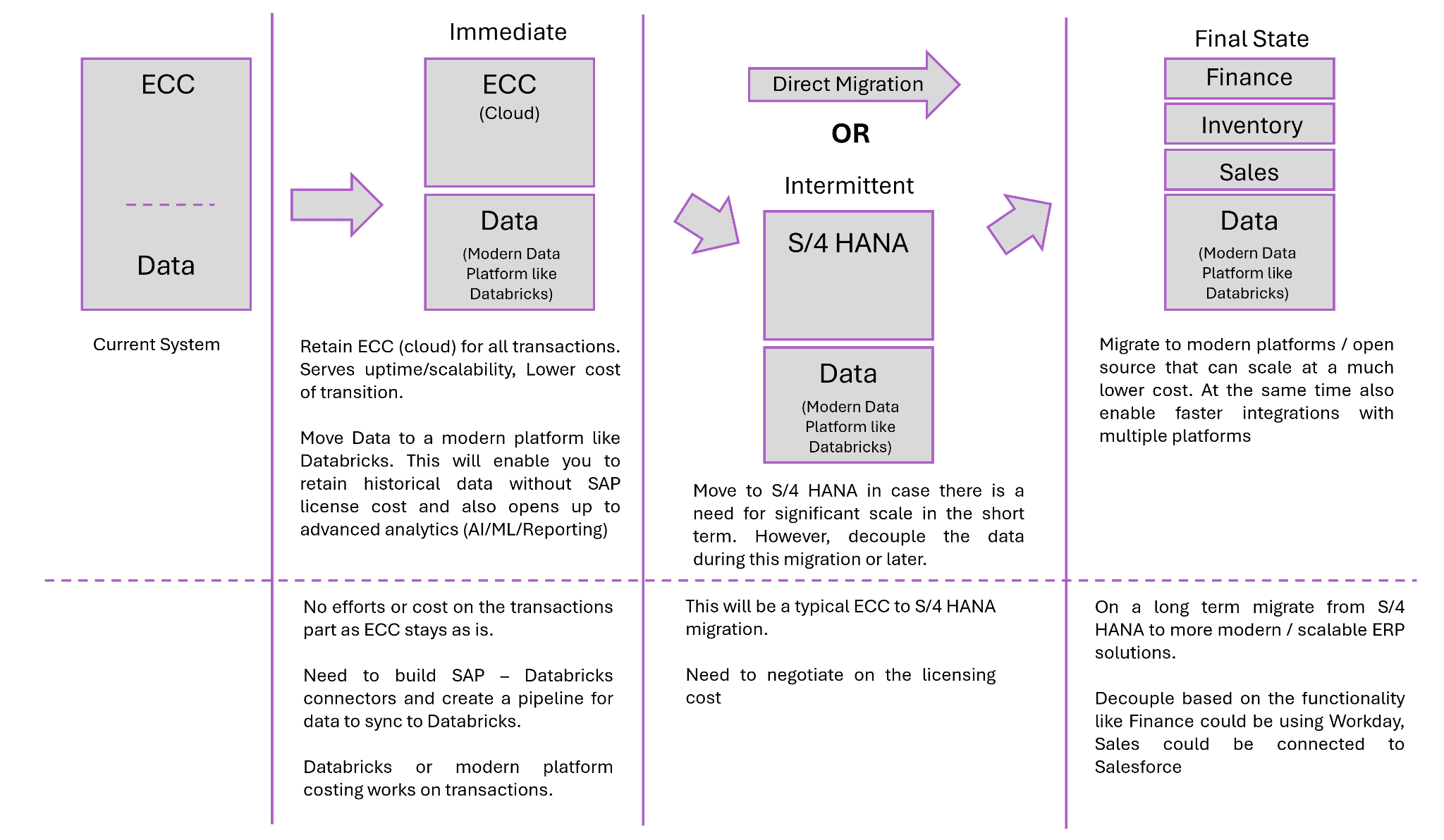
Tenjumps’ 6‑Stage SAP-to-Databricks Migration Blueprint
Stage 1: Assessment and Discovery
We start every SAP-to-Databricks engagement by getting specific about how SAP actually runs your business today. Our team inventories your SAP systems—SAP ECC, SAP S/4HANA, SAP BW, and where relevant, SAP Datasphere—alongside the domains they support and the reports people rely on day-to-day. From there, we look past module checklists into the business data itself: which tables and schema variants matter, how the data model has evolved, and where SAP already feeds external warehouses such as SQL Server.
We then translate core tables, schemas, and business logic into something your lakehouse and analytics teams can work with. At the same time, we identify the use cases and workloads that should drive the initial Databricks design, so the target architecture reflects how SAP is used in practice.
Stage 2: Target Databricks architecture
Once we understand your SAP landscape, we design the Databricks Lakehouse that will host it. We define everything from workspaces to catalogs mapped to SAP domains like finance, supply chain, and order management so that ownership and boundaries are clear from day one. The main layers are implemented in Delta Lake with SAP‑specific Delta tables and Unity Catalog policies that enforce access control and protect secure data without slowing teams down.
We also align this design with your cloud reality. Whether you’re on AWS, on, or running a multi‑cloud strategy, we integrate SAP data into the same data platforms and ecosystem your non‑SAP analytics already depend on. The outcome is a lakehouse topology that feels native to your environment and understandable to your SAP and data teams.
Stage 3: SAP data and schema migration
With the target architecture in place, we shift to moving the data in a controlled way. We implement ingestion and replication from SAP using the right connector for each scenario: ODP, SLT, CDS views, SAP BW extractors, JDBC connections, or SAP APIs where they’re the best fit. We explicitly support both batch and CDC patterns so that key domains can stay aligned with the lakehouse in near real time instead of relying solely on overnight dumps.
As data lands, we normalize SAP schemas into lakehouse‑ready structures, cleaning up naming and relationships, then registering those objects in Unity Catalog. That gives you a single, governed entry point for SAP data in Databricks and avoids the mystery‑table problem that often plagues early migrations.
Stage 4: Pipelines, ETL patterns, and business logic
After the raw movement is in place, we focus on the logic that makes your SAP data meaningful. We re‑implement SAP business logic as Databricks pipelines, using SQL and Python‑based Spark jobs instead of complex ABAP or one‑off extraction scripts that only one person truly understands. Along the way, we build reusable data flows and ETL patterns that map SAP business data and master data into curated datasets the rest of the organization can safely consume.
Where it makes sense, we apply automation and an accelerator to generate boilerplate and standard transformations, but we always keep engineers in control of complex paths. The goal is not to hide what’s happening inside a black box; it’s to give your teams a consistent, debuggable set of patterns they can extend long after the initial migration.
Stage 5: BI, dashboards, and ecosystem integration
We then make sure SAP data shows up where people actually work. We create Databricks SQL endpoints and dashboards or feed your existing BI tools, using curated SAP datasets alongside non‑SAP data sources such as SQL Server and cloud applications. Finance, operations, and supply chain teams see the same numbers, backed by shared metrics and semantic layers, instead of each group maintaining its own version of the truth.
We also pay close attention to compatibility with your existing reporting tools and analytics ecosystem. That means planning how reports migrate, how old and new views run in parallel, and how to avoid breaking downstream consumers as SAP data moves into the lakehouse.
Stage 6: Testing, parallel run, and cutover
Finally, we prove that the new world behaves at least as well as the old one before anything is switched off. Together with your teams, we define validation strategies and data quality checks that compare SAP‑fed reports with Databricks outputs—row counts, aggregates, and key KPIs recognized by business stakeholders. SAP‑sourced pipelines and Databricks workloads then run in parallel, with runtime and behavior monitored and tuned before we cut over.
We execute cutover in stages, starting with lower‑risk use cases and moving into mission‑critical domains only after the evidence is there. That keeps the change end-to-end but controlled and reduces the chance of surprises when you finally retire legacy paths.
Accelerating migration with automation, CI/CD, and orchestration
Automation and accelerators for SAP to Databricks
We don’t believe in magic buttons, but we do believe in smart automation. Our team uses SAP‑aware automation and an accelerator to configure connectors, generate baseline pipelines, and scaffold dataflows from standard extract patterns in ODP, SLT, CDS views, APIs, JDBC‑based sources, and other systems. That cuts down on repetitive wiring work and makes it easier to apply the same approach across multiple systems and domains.
Just as important, we standardize these patterns so that every new SAP integration doesn’t turn into a bespoke project. Teams stop re‑implementing the same logic over and over, and you get a catalog of proven ways to move data out of SAP and into Databricks safely.
CI/CD for SAP‑Fed Pipelines
Once SAP data is flowing into Databricks, we treat those pipelines like software, not scripts. We put notebooks and code (SQL and Python) under version control and wire them into CI/CD so that schema changes and transformations are tested before they land in production. Data engineering around SAP stops living in one person’s head and starts living in Git, with clear history and ownership.
We also use infrastructure‑as‑code and Databricks deployment tooling to keep the dev and test teams aligned across SAP‑driven workloads. That way, you can rehearse changes in lower environments and know what will happen when you promote them.
Orchestrating End‑to‑End workflows on Databricks
The last piece is orchestration. We rebuild SAP extract and refresh chains as modern workflows with robust orchestration, including dependencies and retries instead of fragile cron jobs and hand‑rolled scripts. That gives your operations team a single place to see what’s running, what failed, and what needs attention.
We tune schedules and runtime to balance data volumes and freshness so that end-to-end workflows deliver the right data at the right time without burning unnecessary compute. Over time, that orchestration layer becomes the backbone of how SAP data moves through your lakehouse.
Ensuring Data Integrity and Cutover Safety
Data validation and functional equivalence
We treat validation as a first‑class deliverable, not a final checkbox. For every SAP domain we move into Databricks, we define clear validation rules and: row counts, aggregates, and targeted field‑level comparisons across SAP‑derived datasets and the metrics business users care about most. That gives stakeholders a concrete way to sign off on the new stack instead of relying on spot checks and intuition.
We also call out the edge cases that usually get missed, such as hierarchies and slowly changing master data, and design tests specifically for them. When your teams look at the new datasets and metrics in Databricks, they see behavior that matches their expectations, with data quality issues surfaced early rather than discovered weeks after cutover.
Parallel runs and staged cutover
Once validation is in place, we rely on evidence, not hope, to make cutover decisions. We run SAP‑sourced reports through both the legacy paths and the Databricks lakehouse during a defined parallel‑run period, then compare outputs side by side in dashboards that business and technical teams can review together. That parallel run gives you full visibility into end‑to‑end behavior before any core workloads are switched to the new path.
We execute cutovers gradually, starting with lower‑risk flows and moving into critical workloads only after the numbers line up and the organization has confidence. At every step, we keep rollback options on the table so that a single broken pipeline doesn’t translate into a broken business process.
Operational monitoring and run‑state reporting
After cutover, our focus shifts to maintaining stability and predictability. We surface operational views of SAP‑fed pipelines in Databricks, including status, runtime, error rates, and SLA adherence, enabling your operations and platform teams to see at a glance what’s healthy and what needs attention. That operational view becomes the daily cockpit for the new run state.
We then integrate logs and metrics with your existing monitoring stack, whether across AWS and Azure in the cloud or on premises, so that you’re not asking teams to live in an entirely new set of tools just to understand how SAP data is flowing. Over time, this gives you a consistent story from pipeline behavior to business impact, rather than a scatter of disconnected alerts.
Tenjumps pods for SAP modernization on Databricks
Cross‑Functional pods focused on SAP data
We built around the realities of SAP data, not generic project teams. Each pod combines SAP‑literate consultants and Databricks data engineering talent who understand both SAP business logic and lakehouse design. That mix lets us move quickly without losing sight of how changes land in core processes.
Rather than treating migration as a one‑off project, The pod has a mandate to migrate and stabilize SAP‑related workloads end to end. We measure success by how much legacy risk is retired and how reliably the new platform runs, instead of counting how many tickets get closed.
Reusable migration patterns and accelerators
As we work through domains, we deliberately build a catalog of SAP extract and ETL recipes paired with Databricks ingestion patterns that we know behave well. That catalog typically grows to include:
Common SAP extract patterns such as ODP, SLT, BW extractors, CDS views, and file‑based feeds
Standardized Databricks ingestion flows that reuse the same logging, schema handling, and error‑handling approaches
We then wrap those patterns in automation, templates, and scripts that can be reused across domains and regions instead of reinvented every time. That accelerator effect matters at scale. Each new SAP source becomes faster and less risky to onboard because the core ETL and ingestion patterns are already proven. Your teams get a growing library of ways to move data out of SAP and into the lakehouse without starting from a blank page.
Knowledge Transfer and Enablement
We design the target data model and governance in Unity Catalog with your teams rather than in a vacuum. That co‑design process ensures the lakehouse structure matches how your business thinks about domains, ownership, and risk and that security teams are comfortable with how sensitive data is exposed.
From there, we back the design with documentation, runbooks, and concrete examples of SAP-to-Databricks patterns in action. This empowers your engineers and analysts to extend the data model and add new sources over time without needing us in the room for every change.
Engagement structure, from SAP modernization assessment to full migration
Phase 1: SAP-to-Databricks modernization assessment
We start by getting a clear, shared picture of how SAP is wired into your current data landscape. Our team reviews your SAP systems, the extracts and APIs already in play, and the reporting dependencies that hang off them so that we understand both the technical shape of the landscape and where people actually consume SAP data today. We then align priority use cases, data volumes, and SLAs with what’s realistic on your Databricks Lakehouse so that the plan is driven by business value rather than a generic checklist.
From that assessment, you get a current‑state view of SAP data sources and integration points, plus a high‑level, SAP‑aware Databricks blueprint and a phased data migration roadmap that your platform, SAP, and analytics teams can all work from. When you’re ready to move, you can request your SAP-to-Databricks Modernization Assessment and use it as the foundation for funding, planning, and execution.
Phase 2: Pilot migration for a critical domain
Next, we prove the approach where it matters. Together, we pick a high‑impact domain—often finance or supply chain—and build an end-to-end SAP-to-Databricks path that covers ingestion, pipelines, dashboards, and validation. The goal is to move a real slice of the business, not a toy example, so that stakeholders can see what life looks like once SAP data lives in the lakehouse.
During the pilot, we use that domain to prove performance, data correctness, and resilience under real workloads. Teams see the same numbers in Databricks‑backed dashboards that they trust today, corroborated by concrete validation, and operations sees how the new run state behaves day-to-day.
Phase 3: Scale migration across workloads and regions
Once the pilot is working and trusted, we shift from proving to scaling. We extend the same patterns to more SAP workloads, datasets, and geographies, retiring legacy integrations as lakehouse adoption grows instead of running two worlds in parallel forever. Each wave reuses and refines the foundations from the pilot, so the program accelerates rather than starts from scratch each time.
As more SAP domains move into Databricks, we keep tuning cost, performance, and governance so that SAP becomes one well‑governed part of your broader data cloud and ecosystem. The end state is a platform where SAP data is another first‑class citizen in your lakehouse.
FAQ
Which SAP systems and technologies can you integrate with Databricks?
We typically integrate Databricks with the SAP systems you already rely on most: SAP ECC and SAP S/4HANA for core transactions, SAP BW and SAP Datasphere for analytics workloads, and SAP BTP where you’re building extensions or integrations. Under the hood, that often means working with SLT, ODP, CDS views, and a mix of APIs and JDBC‑based connections to expose the right data sources to the lakehouse in a controlled way.
Can you support real‑time or near-real‑time data from SAP?
Yes. Where it makes sense, we design for real-time or near-real-time behavior, using CDC and replication‑style ingestion so that key tables stay aligned between SAP and Databricks. We tune patterns to your data volumes and runtime constraints, providing you with fresh data for the domains that need it most without overwhelming your SAP systems or your cloud budget.
How do you keep SAP data secure and governed in Databricks?
We lean on Unity Catalog as the governance backbone, then layer your security and compliance requirements on top of it. That means treating SAP data as sensitive by default and enforcing access control at the catalog and table level, backed by data quality checks so that users know what they’re looking at is trusted and appropriately protected.
How does this help our dashboards, metrics, and AI efforts?
Bringing SAP into Databricks gives your teams a single, governed source for the datasets and business data that underpin dashboards and AI initiatives. Instead of rebuilding logic in every report or model, you work from shared, curated layers that support BI and advanced ML on top of the same numbers the business already trusts.
What skills will our team need to support SAP data on Databricks?
Your teams will lean more on SQL and Python, plus modern data engineering practices, than on traditional SAP‑only tooling. We design pipelines and data flows to be approachable to engineers who know Databricks or lakehouse concepts, then back that with enablement so that SAP specialists and data engineers can meet in the middle instead of relying on a handful of experts.
How does this fit with our existing AWS/Azure environment and SQL Server‑based reporting?
We design SAP-to-Databricks patterns to fit into the cloud and reporting landscape you already have. That typically means running Databricks on AWS or Azure alongside your other data platforms and integrating with SQL Server‑based reporting where it still makes sense; Databricks becomes the lakehouse anchor, and SAP data becomes one more governed feed into that platform.
SAP has powered core business processes for decades, but the way most teams still work with SAP data should no longer be business as usual. Transactional screens and legacy reports lock away the very business data analytics and AI programs depend on. As data volumes grow and leaders expect real-time insight, exports and point‑to‑point ETL start to show their limits. The result is fragmented datasets, brittle integrations, and answers that arrive too late to influence decisions and not to mention the integrations and reconciliations across different sources get expensive.
At Tenjumps, we help teams move from SAP‑centric reporting to a Databricks Lakehouse model where curated SAP data lands in Delta Lake and Delta tables, governed centrally by Unity Catalog. From there, your teams can work with that data using SQL, Python, and the BI tools they already trust. We design and implement repeatable pipelines and data flows that bring SAP into your wider data cloud and ecosystem without compromising secure data or destabilizing the systems that run your finance and supply chain processes. The result is a clear end‑to‑end path that turns SAP into a first‑class source for cross‑system analytics, machine learning, and generative AI rather than a bottleneck your teams work around.
What we do:
Assess your SAP systems, core tables, and data models, then prioritize use cases for Databricks Lakehouse across finance, supply chain, and other domains.
Design a Databricks Lakehouse architecture that ingests SAP via the right connector and CDC or replication patterns and exposes curated datasets for analytics and AI.
Build and validate using SQL, Python, and Spark, re‑implementing critical SAP business logic in a maintainable data model.
Operationalize real-time and near-real-time ingestion with robust workflows and orchestration, so SAP changes show up reliably in downstream dashboards and ML models instead of being stuck in overnight batches.
All of this sits inside a structured modernization program. Our repeatable, six‑stage SAP-to-Databricks migration approach enables you to integrate and modernize SAP with confidence and make Databricks the long‑term home for your enterprise data and analytics estate. If you’re ready to get ahead of the bottlenecks, request an SAP-to-Databricks Modernization Assessment or use the SAP-to-Databricks Migration Checklist as an internal accelerator for planning data migration and execution.
Why you can’t wait on migrating SAP to Databricks
SAP is optimized for running transactions, not for serving every downstream analytics and AI need. Even with SAP BW, SAP Datasphere, or SAP BTP in place, it’s hard to join SAP data with non‑SAP sources, scale to new data volumes, or spin up new use cases quickly without another wave of custom work. As more processes span SaaS applications and custom services, the gap grows between what SAP‑centric reporting can deliver and what your data cloud and lakehouse teams are trying to achieve.
Leaving SAP data siloed also introduces real risk. When SAP sits apart from your main data platforms, teams improvise by copying extracts into spreadsheets and one‑off databases, which erodes data quality and governance over time. Complex ABAP and custom extractions become fragile as surrounding tools and APIs evolve. Ad hoc exports and clones make access control and secure data handling harder to enforce consistently across the ecosystem, especially in regulated domains. And because SAP data remains locked behind batch jobs and local reports, you limit real-time and near-real-time dashboards and ML or generative AI experiences that depend on fresh, joined datasets.
Moving SAP data into Databricks changes that trajectory:
The lakehouse engine handles mixed SAP and non‑SAP datasets and large data volumes with elastic runtime and cloud storage, so heavy reporting and ML workloads stop competing with core transactions.
Delta Lake, Delta tables, and Unity Catalog provide consistent governance, lineage, and access control for SAP business and master data in one place, instead of scattering it across unmanaged extracts.
Once SAP sits inside Databricks, you can power BI dashboards and standardized metrics on top of the same curated data model you use for the rest of your lakehouse, while advanced ML and generative AI build on those same foundations.
We’re typically brought in when SAP is clearly critical but the path to Databricks isn’t:
You run core processes such as finance, supply chain, or order management on SAP ECC or SAP S/4HANA and need those workloads available in your Databricks Lakehouse.
You have started experimenting with SAP extractions but don’t yet have a scalable data engineering and orchestration strategy for SAP to Databricks.
You need risk reduction and upside, including faster insight and AI‑ready datasets, in the same program, and you cannot afford broken SAP‑fed dashboards or exposed secure data.
Tenjumps recommends to take up this migration in multiple phases as shown below to ensure there is a minimal impact during migration. Each phase will go through the 6 step migration approach.
Tenjumps’ 6‑Stage SAP-to-Databricks Migration Blueprint
Stage 1: Assessment and Discovery
We start every SAP-to-Databricks engagement by getting specific about how SAP actually runs your business today. Our team inventories your SAP systems—SAP ECC, SAP S/4HANA, SAP BW, and where relevant, SAP Datasphere—alongside the domains they support and the reports people rely on day-to-day. From there, we look past module checklists into the business data itself: which tables and schema variants matter, how the data model has evolved, and where SAP already feeds external warehouses such as SQL Server.
We then translate core tables, schemas, and business logic into something your lakehouse and analytics teams can work with. At the same time, we identify the use cases and workloads that should drive the initial Databricks design, so the target architecture reflects how SAP is used in practice.
Stage 2: Target Databricks architecture
Once we understand your SAP landscape, we design the Databricks Lakehouse that will host it. We define everything from workspaces to catalogs mapped to SAP domains like finance, supply chain, and order management so that ownership and boundaries are clear from day one. The main layers are implemented in Delta Lake with SAP‑specific Delta tables and Unity Catalog policies that enforce access control and protect secure data without slowing teams down.
We also align this design with your cloud reality. Whether you’re on AWS, on, or running a multi‑cloud strategy, we integrate SAP data into the same data platforms and ecosystem your non‑SAP analytics already depend on. The outcome is a lakehouse topology that feels native to your environment and understandable to your SAP and data teams.
Stage 3: SAP data and schema migration
With the target architecture in place, we shift to moving the data in a controlled way. We implement ingestion and replication from SAP using the right connector for each scenario: ODP, SLT, CDS views, SAP BW extractors, JDBC connections, or SAP APIs where they’re the best fit. We explicitly support both batch and CDC patterns so that key domains can stay aligned with the lakehouse in near real time instead of relying solely on overnight dumps.
As data lands, we normalize SAP schemas into lakehouse‑ready structures, cleaning up naming and relationships, then registering those objects in Unity Catalog. That gives you a single, governed entry point for SAP data in Databricks and avoids the mystery‑table problem that often plagues early migrations.
Stage 4: Pipelines, ETL patterns, and business logic
After the raw movement is in place, we focus on the logic that makes your SAP data meaningful. We re‑implement SAP business logic as Databricks pipelines, using SQL and Python‑based Spark jobs instead of complex ABAP or one‑off extraction scripts that only one person truly understands. Along the way, we build reusable data flows and ETL patterns that map SAP business data and master data into curated datasets the rest of the organization can safely consume.
Where it makes sense, we apply automation and an accelerator to generate boilerplate and standard transformations, but we always keep engineers in control of complex paths. The goal is not to hide what’s happening inside a black box; it’s to give your teams a consistent, debuggable set of patterns they can extend long after the initial migration.
Stage 5: BI, dashboards, and ecosystem integration
We then make sure SAP data shows up where people actually work. We create Databricks SQL endpoints and dashboards or feed your existing BI tools, using curated SAP datasets alongside non‑SAP data sources such as SQL Server and cloud applications. Finance, operations, and supply chain teams see the same numbers, backed by shared metrics and semantic layers, instead of each group maintaining its own version of the truth.
We also pay close attention to compatibility with your existing reporting tools and analytics ecosystem. That means planning how reports migrate, how old and new views run in parallel, and how to avoid breaking downstream consumers as SAP data moves into the lakehouse.
Stage 6: Testing, parallel run, and cutover
Finally, we prove that the new world behaves at least as well as the old one before anything is switched off. Together with your teams, we define validation strategies and data quality checks that compare SAP‑fed reports with Databricks outputs—row counts, aggregates, and key KPIs recognized by business stakeholders. SAP‑sourced pipelines and Databricks workloads then run in parallel, with runtime and behavior monitored and tuned before we cut over.
We execute cutover in stages, starting with lower‑risk use cases and moving into mission‑critical domains only after the evidence is there. That keeps the change end-to-end but controlled and reduces the chance of surprises when you finally retire legacy paths.
Accelerating migration with automation, CI/CD, and orchestration
Automation and accelerators for SAP to Databricks
We don’t believe in magic buttons, but we do believe in smart automation. Our team uses SAP‑aware automation and an accelerator to configure connectors, generate baseline pipelines, and scaffold dataflows from standard extract patterns in ODP, SLT, CDS views, APIs, JDBC‑based sources, and other systems. That cuts down on repetitive wiring work and makes it easier to apply the same approach across multiple systems and domains.
Just as important, we standardize these patterns so that every new SAP integration doesn’t turn into a bespoke project. Teams stop re‑implementing the same logic over and over, and you get a catalog of proven ways to move data out of SAP and into Databricks safely.
CI/CD for SAP‑Fed Pipelines
Once SAP data is flowing into Databricks, we treat those pipelines like software, not scripts. We put notebooks and code (SQL and Python) under version control and wire them into CI/CD so that schema changes and transformations are tested before they land in production. Data engineering around SAP stops living in one person’s head and starts living in Git, with clear history and ownership.
We also use infrastructure‑as‑code and Databricks deployment tooling to keep the dev and test teams aligned across SAP‑driven workloads. That way, you can rehearse changes in lower environments and know what will happen when you promote them.
Orchestrating End‑to‑End workflows on Databricks
The last piece is orchestration. We rebuild SAP extract and refresh chains as modern workflows with robust orchestration, including dependencies and retries instead of fragile cron jobs and hand‑rolled scripts. That gives your operations team a single place to see what’s running, what failed, and what needs attention.
We tune schedules and runtime to balance data volumes and freshness so that end-to-end workflows deliver the right data at the right time without burning unnecessary compute. Over time, that orchestration layer becomes the backbone of how SAP data moves through your lakehouse.
Ensuring Data Integrity and Cutover Safety
Data validation and functional equivalence
We treat validation as a first‑class deliverable, not a final checkbox. For every SAP domain we move into Databricks, we define clear validation rules and: row counts, aggregates, and targeted field‑level comparisons across SAP‑derived datasets and the metrics business users care about most. That gives stakeholders a concrete way to sign off on the new stack instead of relying on spot checks and intuition.
We also call out the edge cases that usually get missed, such as hierarchies and slowly changing master data, and design tests specifically for them. When your teams look at the new datasets and metrics in Databricks, they see behavior that matches their expectations, with data quality issues surfaced early rather than discovered weeks after cutover.
Parallel runs and staged cutover
Once validation is in place, we rely on evidence, not hope, to make cutover decisions. We run SAP‑sourced reports through both the legacy paths and the Databricks lakehouse during a defined parallel‑run period, then compare outputs side by side in dashboards that business and technical teams can review together. That parallel run gives you full visibility into end‑to‑end behavior before any core workloads are switched to the new path.
We execute cutovers gradually, starting with lower‑risk flows and moving into critical workloads only after the numbers line up and the organization has confidence. At every step, we keep rollback options on the table so that a single broken pipeline doesn’t translate into a broken business process.
Operational monitoring and run‑state reporting
After cutover, our focus shifts to maintaining stability and predictability. We surface operational views of SAP‑fed pipelines in Databricks, including status, runtime, error rates, and SLA adherence, enabling your operations and platform teams to see at a glance what’s healthy and what needs attention. That operational view becomes the daily cockpit for the new run state.
We then integrate logs and metrics with your existing monitoring stack, whether across AWS and Azure in the cloud or on premises, so that you’re not asking teams to live in an entirely new set of tools just to understand how SAP data is flowing. Over time, this gives you a consistent story from pipeline behavior to business impact, rather than a scatter of disconnected alerts.
Tenjumps pods for SAP modernization on Databricks
Cross‑Functional pods focused on SAP data
We built around the realities of SAP data, not generic project teams. Each pod combines SAP‑literate consultants and Databricks data engineering talent who understand both SAP business logic and lakehouse design. That mix lets us move quickly without losing sight of how changes land in core processes.
Rather than treating migration as a one‑off project, The pod has a mandate to migrate and stabilize SAP‑related workloads end to end. We measure success by how much legacy risk is retired and how reliably the new platform runs, instead of counting how many tickets get closed.
Reusable migration patterns and accelerators
As we work through domains, we deliberately build a catalog of SAP extract and ETL recipes paired with Databricks ingestion patterns that we know behave well. That catalog typically grows to include:
Common SAP extract patterns such as ODP, SLT, BW extractors, CDS views, and file‑based feeds
Standardized Databricks ingestion flows that reuse the same logging, schema handling, and error‑handling approaches
We then wrap those patterns in automation, templates, and scripts that can be reused across domains and regions instead of reinvented every time. That accelerator effect matters at scale. Each new SAP source becomes faster and less risky to onboard because the core ETL and ingestion patterns are already proven. Your teams get a growing library of ways to move data out of SAP and into the lakehouse without starting from a blank page.
Knowledge Transfer and Enablement
We design the target data model and governance in Unity Catalog with your teams rather than in a vacuum. That co‑design process ensures the lakehouse structure matches how your business thinks about domains, ownership, and risk and that security teams are comfortable with how sensitive data is exposed.
From there, we back the design with documentation, runbooks, and concrete examples of SAP-to-Databricks patterns in action. This empowers your engineers and analysts to extend the data model and add new sources over time without needing us in the room for every change.
Engagement structure, from SAP modernization assessment to full migration
Phase 1: SAP-to-Databricks modernization assessment
We start by getting a clear, shared picture of how SAP is wired into your current data landscape. Our team reviews your SAP systems, the extracts and APIs already in play, and the reporting dependencies that hang off them so that we understand both the technical shape of the landscape and where people actually consume SAP data today. We then align priority use cases, data volumes, and SLAs with what’s realistic on your Databricks Lakehouse so that the plan is driven by business value rather than a generic checklist.
From that assessment, you get a current‑state view of SAP data sources and integration points, plus a high‑level, SAP‑aware Databricks blueprint and a phased data migration roadmap that your platform, SAP, and analytics teams can all work from. When you’re ready to move, you can request your SAP-to-Databricks Modernization Assessment and use it as the foundation for funding, planning, and execution.
Phase 2: Pilot migration for a critical domain
Next, we prove the approach where it matters. Together, we pick a high‑impact domain—often finance or supply chain—and build an end-to-end SAP-to-Databricks path that covers ingestion, pipelines, dashboards, and validation. The goal is to move a real slice of the business, not a toy example, so that stakeholders can see what life looks like once SAP data lives in the lakehouse.
During the pilot, we use that domain to prove performance, data correctness, and resilience under real workloads. Teams see the same numbers in Databricks‑backed dashboards that they trust today, corroborated by concrete validation, and operations sees how the new run state behaves day-to-day.
Phase 3: Scale migration across workloads and regions
Once the pilot is working and trusted, we shift from proving to scaling. We extend the same patterns to more SAP workloads, datasets, and geographies, retiring legacy integrations as lakehouse adoption grows instead of running two worlds in parallel forever. Each wave reuses and refines the foundations from the pilot, so the program accelerates rather than starts from scratch each time.
As more SAP domains move into Databricks, we keep tuning cost, performance, and governance so that SAP becomes one well‑governed part of your broader data cloud and ecosystem. The end state is a platform where SAP data is another first‑class citizen in your lakehouse.
FAQ
Which SAP systems and technologies can you integrate with Databricks?
We typically integrate Databricks with the SAP systems you already rely on most: SAP ECC and SAP S/4HANA for core transactions, SAP BW and SAP Datasphere for analytics workloads, and SAP BTP where you’re building extensions or integrations. Under the hood, that often means working with SLT, ODP, CDS views, and a mix of APIs and JDBC‑based connections to expose the right data sources to the lakehouse in a controlled way.
Can you support real‑time or near-real‑time data from SAP?
Yes. Where it makes sense, we design for real-time or near-real-time behavior, using CDC and replication‑style ingestion so that key tables stay aligned between SAP and Databricks. We tune patterns to your data volumes and runtime constraints, providing you with fresh data for the domains that need it most without overwhelming your SAP systems or your cloud budget.
How do you keep SAP data secure and governed in Databricks?
We lean on Unity Catalog as the governance backbone, then layer your security and compliance requirements on top of it. That means treating SAP data as sensitive by default and enforcing access control at the catalog and table level, backed by data quality checks so that users know what they’re looking at is trusted and appropriately protected.
How does this help our dashboards, metrics, and AI efforts?
Bringing SAP into Databricks gives your teams a single, governed source for the datasets and business data that underpin dashboards and AI initiatives. Instead of rebuilding logic in every report or model, you work from shared, curated layers that support BI and advanced ML on top of the same numbers the business already trusts.
What skills will our team need to support SAP data on Databricks?
Your teams will lean more on SQL and Python, plus modern data engineering practices, than on traditional SAP‑only tooling. We design pipelines and data flows to be approachable to engineers who know Databricks or lakehouse concepts, then back that with enablement so that SAP specialists and data engineers can meet in the middle instead of relying on a handful of experts.
How does this fit with our existing AWS/Azure environment and SQL Server‑based reporting?
We design SAP-to-Databricks patterns to fit into the cloud and reporting landscape you already have. That typically means running Databricks on AWS or Azure alongside your other data platforms and integrating with SQL Server‑based reporting where it still makes sense; Databricks becomes the lakehouse anchor, and SAP data becomes one more governed feed into that platform.