

How data teams use Databricks Genie to write SQL, build dashboards, and move faster
How data teams use Databricks Genie to write SQL, build dashboards, and move faster
Written by
Arvind Divakar
Share
SQL writing, pipeline debugging, dashboard builds, and documentation are unavoidable parts of modern data work. They are also some of the biggest time drains for data engineers, analysts, and analytics teams. The problem is not that these tasks are unimportant — it is that they routinely consume hours that could be spent improving data quality, solving business problems, and moving projects forward.
Databricks Genie is built to reduce that friction. Rather than treating AI as a separate tool bolted onto the side of a workflow, Genie brings natural language assistance directly into the Databricks platform. It helps users generate SQL, explore datasets, troubleshoot issues, build dashboards, and document logic without leaving the environment where the work already happens.
This article breaks down where Databricks Genie can help, where human review is still essential, and how data teams can start using it without disrupting existing pipelines, dashboards, or governance processes.
What is Databricks Genie?
Databricks Genie is an AI-powered assistant experience within the Databricks ecosystem that helps users interact with data, code, pipelines, and dashboards using natural language. There are three products in the Genie family, each serving a different audience.
Genie Agents allows business users and analytics teams to ask natural language questions about governed datasets. Instead of writing SQL from scratch, users can ask questions such as "What were our top delayed lanes last week?" or "Show shipment volume by office and day," and Genie returns SQL, result tables, and visualizations based on curated business context. Genie Agents are domain-specific, curated by subject matter experts, and continuously adapt to evolving business concepts.
Genie Code is designed for developers and technical practitioners. It supports writing code, generating SQL, building pipelines, debugging errors, and creating AI/BI dashboards. Because it operates inside the Databricks workspace, it works directly with actual tables, metadata, lineage, and the development environment — closer to the data than a generic AI assistant can get.
Genie One is the unified interface for business users, combining governed data access, dashboards, and agentic capabilities in a single experience.
In a data engineering context, this matters because the assistant is not just answering abstract questions. It helps with the actual workflow: understanding tables, writing transformations, creating queries, investigating errors, and turning data into usable business outputs.
Genie Code is especially useful for data engineers who build and maintain pipelines, data analysts who write SQL and create recurring reports, BI teams that build dashboards and business-facing insights, analytics engineers who translate business logic into reusable data models, and business users who need governed self-service answers from trusted datasets.
The goal is not to replace technical judgment. The goal is to reduce repetitive manual effort and help teams move from question to answer faster.
The case for AI-assisted development
Modern data workflows involve a significant amount of repetitive work. A data engineer may spend time writing boilerplate SQL, checking schema differences, debugging failed jobs, validating transformations, updating documentation, and answering follow-up questions from stakeholders. An analyst may spend hours creating variations of the same query, adjusting filters, formatting dashboards, or explaining why a metric changed.
None of this work disappears. But a large portion of it can be accelerated.
The biggest time losses typically happen in five places. Starting from a blank query — writing the first version of SQL often takes longer than refining it, because the user must recall table names, join keys, date logic, filters, and business rules before the analysis even begins. Debugging pipeline failures — even simple errors can require checking logs, tracing dependencies, validating schema changes, and identifying where logic broke. Building dashboards from scratch — datasets, visualizations, filters, titles, layout decisions, and business context all need to come together before stakeholders see a first draft. Documenting transformations — documentation is consistently delayed because engineers prioritize delivery, which creates long-term knowledge gaps. And exploring unfamiliar datasets — when someone joins a project or receives a new request, they may not know which tables to use, what columns mean, or how metrics are calculated.
Databricks Genie helps reduce friction in each of these areas by allowing users to describe what they want in plain English and receive a strong starting point.
Manual dashboard creation vs. Genie Code-assisted workflow
To understand the practical difference, I created the same simple volume dashboard using two approaches: the traditional manual workflow and the Genie Code-assisted workflow.
Manual workflow
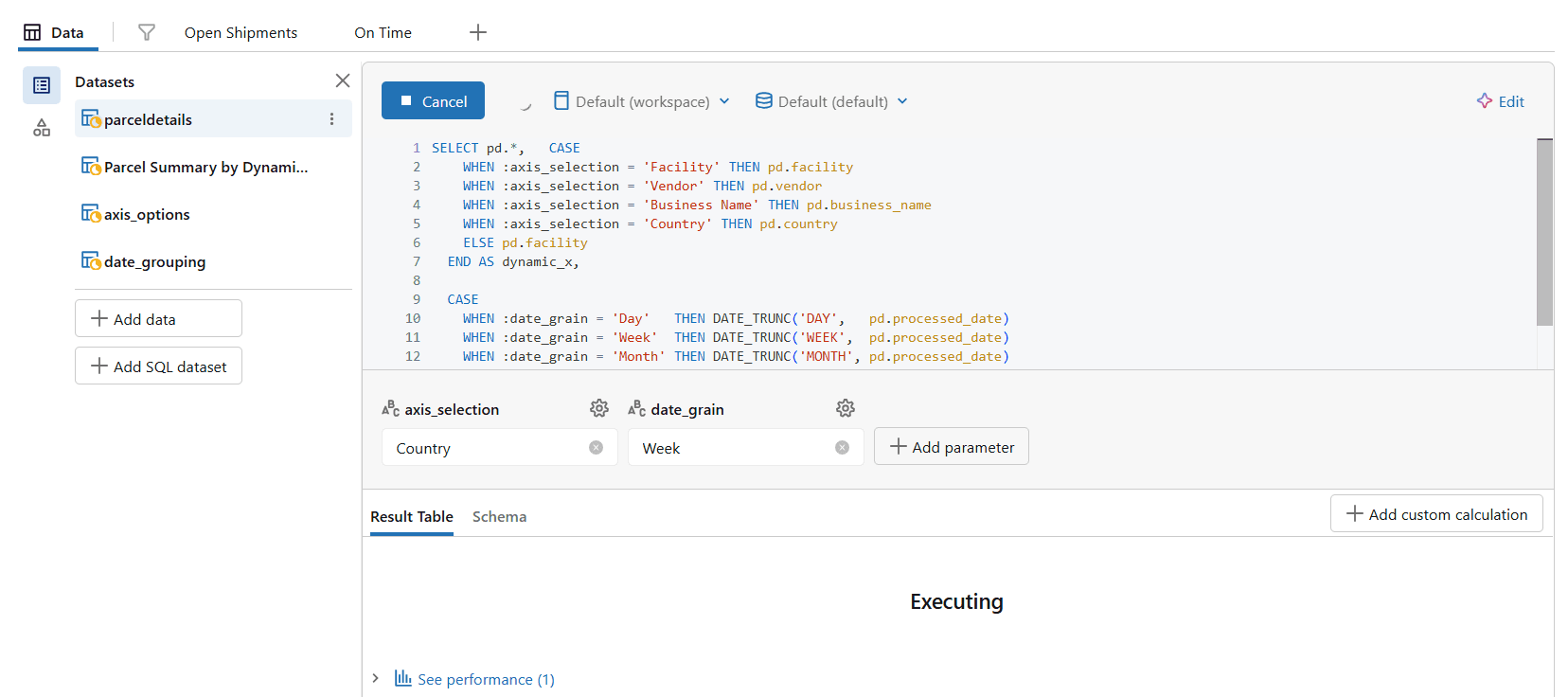
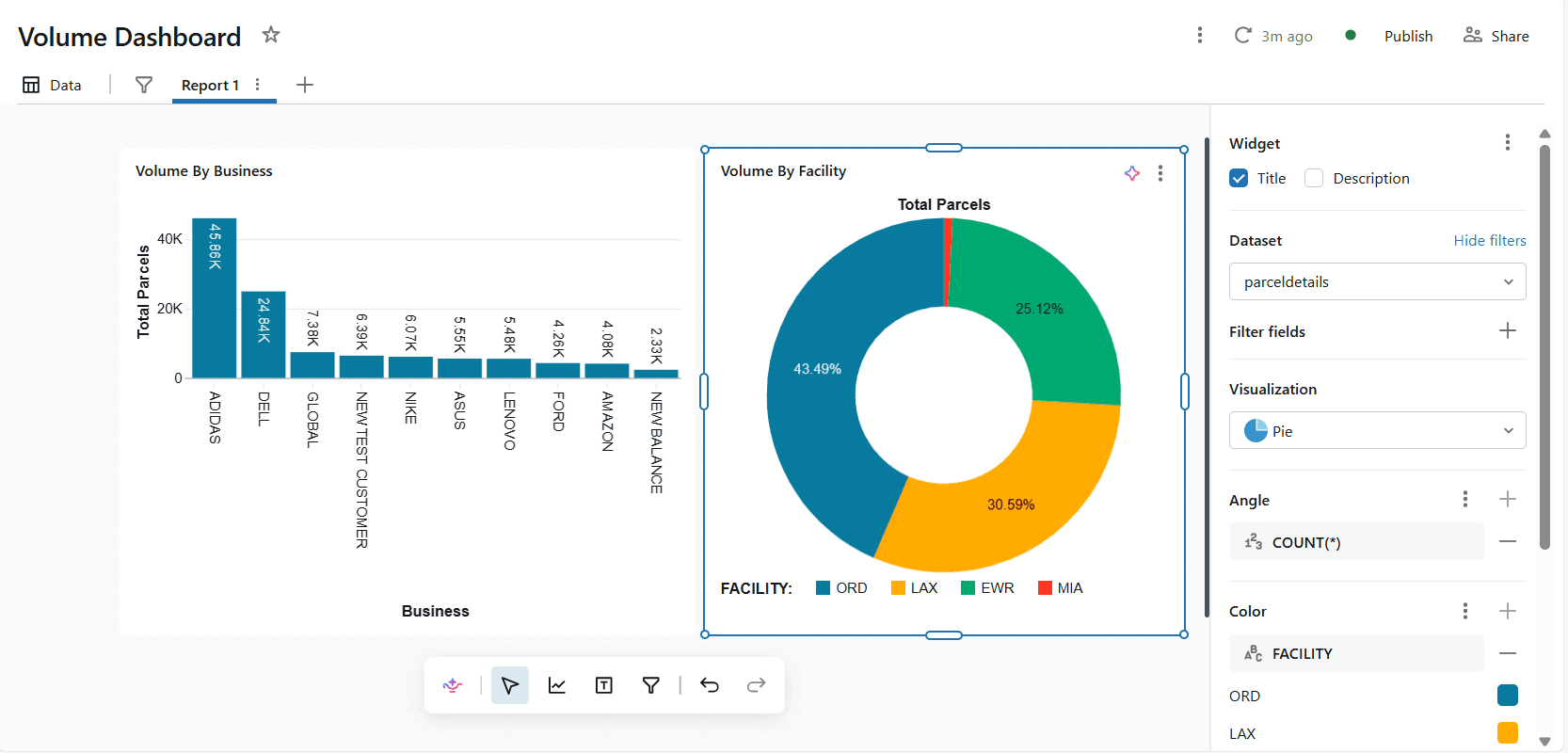
In the manual process, the first step was identifying the fields needed for the dashboard — added date, business, facility, and other relevant columns. After selecting the required fields, the SQL query was updated manually and additional calculations were added to support the visuals. Once the data was ready, visuals were added to the dashboard and chart settings were adjusted manually: visualization type, field assignments, labels, and formatting.

Genie Code-assisted workflow
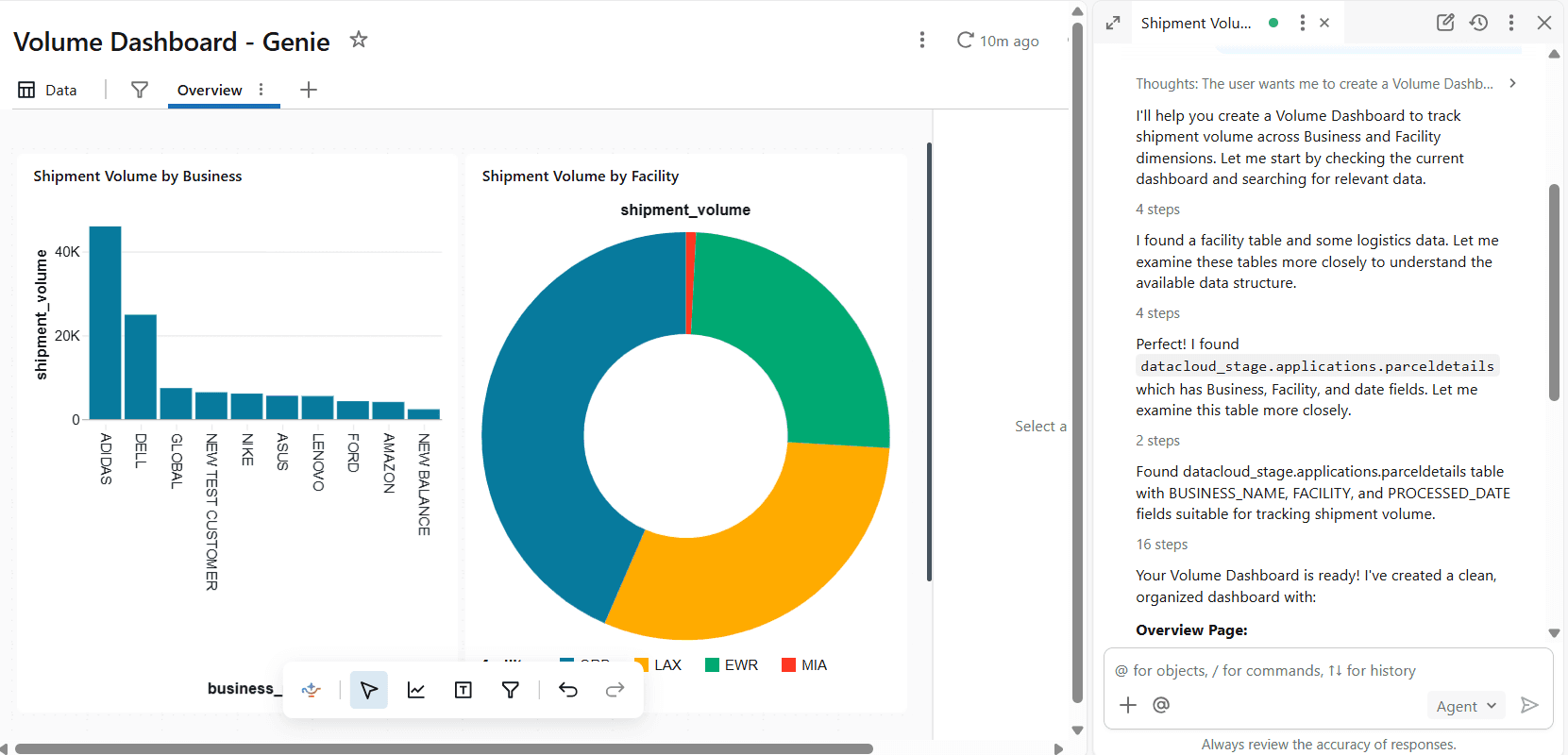
For the Genie Code workflow, the dashboard requirement was entered as a natural language prompt directly inside the dashboard creation experience. Genie Code generated a dashboard output that matched the manually created version, producing the required volume-based visuals with significantly less manual setup.
Key takeaway
The manual workflow required multiple sequential steps: selecting fields, modifying SQL, calculating metrics, adding visuals, and adjusting settings. Genie Code simplified this by allowing the requirement to be described in plain English and generating a comparable result faster. The analyst still needs to validate the output, confirm business logic, and make final adjustments — but the blank-page effort is substantially reduced.
Core use cases in production
Generating and refining SQL queries with natural language prompts
One of the most practical uses of Databricks Genie is SQL generation. Instead of writing every query from scratch, users can describe the business question and ask Genie to generate the first version. For example: "Show total shipment volume by office for the last 30 days," or "Find records where delivery status is false but a return-to-sender event exists."

This is useful because SQL development involves repetitive patterns: filtering dates, grouping dimensions, joining lookup tables, calculating percentages, and formatting results. Genie can accelerate the first draft and help users refine through follow-up prompts. Generated SQL should always be reviewed — the user still needs to confirm table selection, joins, business rules, date logic, and edge cases.
Troubleshooting and debugging pipeline issues faster
Pipeline debugging is another strong use case. Data teams often spend significant time reading error messages, checking transformation logic, and identifying where a workflow failed. Genie can help interpret errors, suggest likely causes, and recommend next steps — including explaining SQL compilation errors, identifying missing columns or schema changes, reviewing transformation logic, and helping users understand pipeline dependencies.
A common production scenario is when a pipeline starts failing after a source table changes. Genie can summarize the issue, point out the mismatch, and suggest how to adjust the transformation. The engineer still validates the fix, but the investigation starts faster.
Building dashboards and surfacing business insights without starting from scratch
Dashboards take time because they require both technical and business thinking: the right dataset, the right measures, the right visualizations, and an organization that stakeholders can follow. Genie Code can assist with dashboard authoring by generating datasets, visualizations, filters, pages, and layouts from natural language instructions. This is especially valuable for proof-of-concepts, stakeholder demos, and early dashboard iterations where speed matters.
Documenting data transformations at speed
Documentation is one of the easiest tasks to delay and one of the hardest to recover. When business logic lives only inside SQL queries or pipeline notebooks, teams become dependent on individual knowledge. Genie Code can summarize transformation logic, explain SQL steps, and create first-draft documentation for tables, metrics, and workflows. The best approach is to use Genie Code to generate the first draft, then have the data owner review and approve the final version.
Exploring unfamiliar datasets without deep prior context
Data teams regularly receive requests involving tables they do not use every day. Before writing a query, they need to understand the schema, column names, relationships, and business meaning. Genie can help users explore unfamiliar datasets by answering questions like "What does this table contain?" or "How should this table join to the parcel table?" This is particularly useful in large Databricks environments where many teams create and maintain different tables.
Governance, security, and enterprise readiness
AI-assisted development is only useful in an enterprise environment if it respects governance and security boundaries. Databricks Genie operates within the Databricks platform and works with Unity Catalog governance, meaning access to data, tables, columns, and operations is controlled by the permissions already defined in the platform. If a user does not have permission to access certain data, Genie does not become a workaround.
Before rolling out AI-assisted workflows, teams should verify which users have access to Genie features, which datasets are exposed through Genie Agents, whether Unity Catalog permissions are correctly configured, whether sensitive columns are protected, whether generated outputs follow internal data policies, how prompts and usage are monitored, and who is responsible for validating generated SQL and dashboards.
Governance should not be treated as an afterthought. Genie becomes significantly more useful when the underlying data foundation is already organized — trusted datasets, clear table descriptions, approved metrics, and defined ownership.
Current capabilities and honest limitations
What Genie does well today
Genie is strong at creating first drafts, accelerating repetitive work, and helping users move faster through common data tasks. It works well for generating and explaining SQL, suggesting fixes for errors, creating dashboard drafts, exploring table structures, summarizing transformation logic, and speeding up documentation. It is especially helpful when the user knows the business question but does not want to start from a blank screen.
Where human review is still essential
Human review is required for anything that affects production logic, business reporting, executive dashboards, compliance, or customer-facing outputs. A data professional should still validate join logic, timezone conversions, metric definitions, dashboard accuracy, and data security boundaries. Genie can suggest the path, but the data team owns the result.
How to integrate Genie into your team's workflow
The best way to adopt Databricks Genie is to start small with low-risk use cases before applying it to critical production workflows. Teams can begin by using Genie to draft SQL, explain existing queries, create first-draft dashboards, document transformations, explore new datasets, and troubleshoot non-critical pipeline issues.
As users become more comfortable, Genie can gradually support dashboard prototyping, pipeline development, and governed self-service analytics. Better results also depend on clear prompts — instead of asking "Show delivery performance," users should include the metric, date range, filters, grouping fields, and any relevant business rules.
A phased rollout works best: start with exploration, expand to internal productivity tasks, introduce curated Genie Agents for trusted business datasets, and make Genie-assisted development part of the regular workflow. This approach improves speed without weakening governance or disrupting existing pipelines.
Is Databricks Genie right for your team?
Databricks Genie is a strong fit for teams that already use Databricks for data engineering, analytics, dashboards, or AI/BI workflows — especially when teams spend significant time writing SQL, answering repeated data questions, building dashboards, debugging pipelines, or documenting business logic.
Before adopting Genie, teams should ensure their datasets are well documented, metric definitions are clear, permissions are properly configured, and generated outputs have a defined review process. Genie is not a replacement for data engineers or analysts. It is a force multiplier that helps teams reduce manual effort and focus more on solving business problems.
Final thoughts
The real value of Databricks Genie is not just faster SQL or quicker dashboard drafts. The bigger value is reducing the distance between a business question and a trusted answer.
For data engineering teams, that means faster development cycles, quicker debugging, and better documentation. For analytics teams, it means easier exploration, faster dashboard creation, and more responsive reporting. For business teams, it means a more natural way to interact with governed data.
The teams that get the most value will not be the ones that treat Genie as a magic button. They will be the ones that combine it with strong governance, clear business definitions, good metadata, and disciplined human review. Used that way, Databricks Genie can become a practical AI layer for modern data work — close to the data, governed by the platform, and useful across engineering, analytics, and dashboard development.
SQL writing, pipeline debugging, dashboard builds, and documentation are unavoidable parts of modern data work. They are also some of the biggest time drains for data engineers, analysts, and analytics teams. The problem is not that these tasks are unimportant — it is that they routinely consume hours that could be spent improving data quality, solving business problems, and moving projects forward.
Databricks Genie is built to reduce that friction. Rather than treating AI as a separate tool bolted onto the side of a workflow, Genie brings natural language assistance directly into the Databricks platform. It helps users generate SQL, explore datasets, troubleshoot issues, build dashboards, and document logic without leaving the environment where the work already happens.
This article breaks down where Databricks Genie can help, where human review is still essential, and how data teams can start using it without disrupting existing pipelines, dashboards, or governance processes.
What is Databricks Genie?
Databricks Genie is an AI-powered assistant experience within the Databricks ecosystem that helps users interact with data, code, pipelines, and dashboards using natural language. There are three products in the Genie family, each serving a different audience.
Genie Agents allows business users and analytics teams to ask natural language questions about governed datasets. Instead of writing SQL from scratch, users can ask questions such as "What were our top delayed lanes last week?" or "Show shipment volume by office and day," and Genie returns SQL, result tables, and visualizations based on curated business context. Genie Agents are domain-specific, curated by subject matter experts, and continuously adapt to evolving business concepts.
Genie Code is designed for developers and technical practitioners. It supports writing code, generating SQL, building pipelines, debugging errors, and creating AI/BI dashboards. Because it operates inside the Databricks workspace, it works directly with actual tables, metadata, lineage, and the development environment — closer to the data than a generic AI assistant can get.
Genie One is the unified interface for business users, combining governed data access, dashboards, and agentic capabilities in a single experience.
In a data engineering context, this matters because the assistant is not just answering abstract questions. It helps with the actual workflow: understanding tables, writing transformations, creating queries, investigating errors, and turning data into usable business outputs.
Genie Code is especially useful for data engineers who build and maintain pipelines, data analysts who write SQL and create recurring reports, BI teams that build dashboards and business-facing insights, analytics engineers who translate business logic into reusable data models, and business users who need governed self-service answers from trusted datasets.
The goal is not to replace technical judgment. The goal is to reduce repetitive manual effort and help teams move from question to answer faster.
The case for AI-assisted development
Modern data workflows involve a significant amount of repetitive work. A data engineer may spend time writing boilerplate SQL, checking schema differences, debugging failed jobs, validating transformations, updating documentation, and answering follow-up questions from stakeholders. An analyst may spend hours creating variations of the same query, adjusting filters, formatting dashboards, or explaining why a metric changed.
None of this work disappears. But a large portion of it can be accelerated.
The biggest time losses typically happen in five places. Starting from a blank query — writing the first version of SQL often takes longer than refining it, because the user must recall table names, join keys, date logic, filters, and business rules before the analysis even begins. Debugging pipeline failures — even simple errors can require checking logs, tracing dependencies, validating schema changes, and identifying where logic broke. Building dashboards from scratch — datasets, visualizations, filters, titles, layout decisions, and business context all need to come together before stakeholders see a first draft. Documenting transformations — documentation is consistently delayed because engineers prioritize delivery, which creates long-term knowledge gaps. And exploring unfamiliar datasets — when someone joins a project or receives a new request, they may not know which tables to use, what columns mean, or how metrics are calculated.
Databricks Genie helps reduce friction in each of these areas by allowing users to describe what they want in plain English and receive a strong starting point.
Manual dashboard creation vs. Genie Code-assisted workflow
To understand the practical difference, I created the same simple volume dashboard using two approaches: the traditional manual workflow and the Genie Code-assisted workflow.
Manual workflow
In the manual process, the first step was identifying the fields needed for the dashboard — added date, business, facility, and other relevant columns. After selecting the required fields, the SQL query was updated manually and additional calculations were added to support the visuals. Once the data was ready, visuals were added to the dashboard and chart settings were adjusted manually: visualization type, field assignments, labels, and formatting.
Genie Code-assisted workflow
For the Genie Code workflow, the dashboard requirement was entered as a natural language prompt directly inside the dashboard creation experience. Genie Code generated a dashboard output that matched the manually created version, producing the required volume-based visuals with significantly less manual setup.
Key takeaway
The manual workflow required multiple sequential steps: selecting fields, modifying SQL, calculating metrics, adding visuals, and adjusting settings. Genie Code simplified this by allowing the requirement to be described in plain English and generating a comparable result faster. The analyst still needs to validate the output, confirm business logic, and make final adjustments — but the blank-page effort is substantially reduced.
Core use cases in production
Generating and refining SQL queries with natural language prompts
One of the most practical uses of Databricks Genie is SQL generation. Instead of writing every query from scratch, users can describe the business question and ask Genie to generate the first version. For example: "Show total shipment volume by office for the last 30 days," or "Find records where delivery status is false but a return-to-sender event exists."
This is useful because SQL development involves repetitive patterns: filtering dates, grouping dimensions, joining lookup tables, calculating percentages, and formatting results. Genie can accelerate the first draft and help users refine through follow-up prompts. Generated SQL should always be reviewed — the user still needs to confirm table selection, joins, business rules, date logic, and edge cases.
Troubleshooting and debugging pipeline issues faster
Pipeline debugging is another strong use case. Data teams often spend significant time reading error messages, checking transformation logic, and identifying where a workflow failed. Genie can help interpret errors, suggest likely causes, and recommend next steps — including explaining SQL compilation errors, identifying missing columns or schema changes, reviewing transformation logic, and helping users understand pipeline dependencies.
A common production scenario is when a pipeline starts failing after a source table changes. Genie can summarize the issue, point out the mismatch, and suggest how to adjust the transformation. The engineer still validates the fix, but the investigation starts faster.
Building dashboards and surfacing business insights without starting from scratch
Dashboards take time because they require both technical and business thinking: the right dataset, the right measures, the right visualizations, and an organization that stakeholders can follow. Genie Code can assist with dashboard authoring by generating datasets, visualizations, filters, pages, and layouts from natural language instructions. This is especially valuable for proof-of-concepts, stakeholder demos, and early dashboard iterations where speed matters.
Documenting data transformations at speed
Documentation is one of the easiest tasks to delay and one of the hardest to recover. When business logic lives only inside SQL queries or pipeline notebooks, teams become dependent on individual knowledge. Genie Code can summarize transformation logic, explain SQL steps, and create first-draft documentation for tables, metrics, and workflows. The best approach is to use Genie Code to generate the first draft, then have the data owner review and approve the final version.
Exploring unfamiliar datasets without deep prior context
Data teams regularly receive requests involving tables they do not use every day. Before writing a query, they need to understand the schema, column names, relationships, and business meaning. Genie can help users explore unfamiliar datasets by answering questions like "What does this table contain?" or "How should this table join to the parcel table?" This is particularly useful in large Databricks environments where many teams create and maintain different tables.
Governance, security, and enterprise readiness
AI-assisted development is only useful in an enterprise environment if it respects governance and security boundaries. Databricks Genie operates within the Databricks platform and works with Unity Catalog governance, meaning access to data, tables, columns, and operations is controlled by the permissions already defined in the platform. If a user does not have permission to access certain data, Genie does not become a workaround.
Before rolling out AI-assisted workflows, teams should verify which users have access to Genie features, which datasets are exposed through Genie Agents, whether Unity Catalog permissions are correctly configured, whether sensitive columns are protected, whether generated outputs follow internal data policies, how prompts and usage are monitored, and who is responsible for validating generated SQL and dashboards.
Governance should not be treated as an afterthought. Genie becomes significantly more useful when the underlying data foundation is already organized — trusted datasets, clear table descriptions, approved metrics, and defined ownership.
Current capabilities and honest limitations
What Genie does well today
Genie is strong at creating first drafts, accelerating repetitive work, and helping users move faster through common data tasks. It works well for generating and explaining SQL, suggesting fixes for errors, creating dashboard drafts, exploring table structures, summarizing transformation logic, and speeding up documentation. It is especially helpful when the user knows the business question but does not want to start from a blank screen.
Where human review is still essential
Human review is required for anything that affects production logic, business reporting, executive dashboards, compliance, or customer-facing outputs. A data professional should still validate join logic, timezone conversions, metric definitions, dashboard accuracy, and data security boundaries. Genie can suggest the path, but the data team owns the result.
How to integrate Genie into your team's workflow
The best way to adopt Databricks Genie is to start small with low-risk use cases before applying it to critical production workflows. Teams can begin by using Genie to draft SQL, explain existing queries, create first-draft dashboards, document transformations, explore new datasets, and troubleshoot non-critical pipeline issues.
As users become more comfortable, Genie can gradually support dashboard prototyping, pipeline development, and governed self-service analytics. Better results also depend on clear prompts — instead of asking "Show delivery performance," users should include the metric, date range, filters, grouping fields, and any relevant business rules.
A phased rollout works best: start with exploration, expand to internal productivity tasks, introduce curated Genie Agents for trusted business datasets, and make Genie-assisted development part of the regular workflow. This approach improves speed without weakening governance or disrupting existing pipelines.
Is Databricks Genie right for your team?
Databricks Genie is a strong fit for teams that already use Databricks for data engineering, analytics, dashboards, or AI/BI workflows — especially when teams spend significant time writing SQL, answering repeated data questions, building dashboards, debugging pipelines, or documenting business logic.
Before adopting Genie, teams should ensure their datasets are well documented, metric definitions are clear, permissions are properly configured, and generated outputs have a defined review process. Genie is not a replacement for data engineers or analysts. It is a force multiplier that helps teams reduce manual effort and focus more on solving business problems.
Final thoughts
The real value of Databricks Genie is not just faster SQL or quicker dashboard drafts. The bigger value is reducing the distance between a business question and a trusted answer.
For data engineering teams, that means faster development cycles, quicker debugging, and better documentation. For analytics teams, it means easier exploration, faster dashboard creation, and more responsive reporting. For business teams, it means a more natural way to interact with governed data.
The teams that get the most value will not be the ones that treat Genie as a magic button. They will be the ones that combine it with strong governance, clear business definitions, good metadata, and disciplined human review. Used that way, Databricks Genie can become a practical AI layer for modern data work — close to the data, governed by the platform, and useful across engineering, analytics, and dashboard development.